Wuffi and Typora at a glance
The useful questions are whether an editor fits your writing, whether you can keep using your documents, and what you need to set up before it helps. Prices and availability below were checked on October 26, 2026. Wuffi details describe our current product plan; competitor details link to official sources.
| Consideration | Wuffi | Typora |
|---|---|---|
| Editing | Switch between visual Markdown and source modes | Live preview while editing Markdown |
| Workflow examined here | Select a passage, request a revision, and review individual proposed changes | Its documented Markdown writing and preview workflow |
| Platforms | Developed and verified on Windows x64; public release in preparation | Windows, macOS and Linux |
| Price and evaluation | Planned US$15 one-time license, seven-day trial, two simultaneous activations; not available to buy yet | US$14.99 before tax, one-time purchase, 15-day trial, up to three devices per person |
The purchase prices are close. Wuffi is not positioned as a cheaper, free Typora replacement. Consider taxes and any model-service costs as well as the license. A change of editor should earn its place by improving something you do, rather than by a misleading price comparison.
Evaluate ordinary writing before adding AI
You will spend most of your time with the document itself. Look at the font, line length, headings, lists, pasted text and save process. Try opening a document again after closing it. These ordinary actions matter more than an impressive feature list if they interrupt your concentration every day.
Wuffi offers visual and source editing, with focus and typewriter modes. Use Ctrl + / to switch editing modes, and F8 or F9 for the writing modes. The aim is to keep a short path between putting down a sentence and continuing with the next one.
Typora's documented emphasis on minimal editing and live preview may already fit your habits. Identify a specific friction before considering a switch: perhaps copying passages into another window, keeping track of revisions, or deciding which suggestions to keep. If there is no recurring problem, a new editor may add more adjustment than value.

Keep the proposed changes inside the document
Wuffi's review workflow begins with a selected passage. Open the AI panel with Ctrl + J, describe what should change, and inspect the proposal in the article. You can accept one sentence and reject another instead of replacing the passage with an entire answer copied from a chat window.
For a useful evaluation, choose a short introduction from something you actually write. Ask for one limited change: “Shorten this paragraph, keep the first-person voice, and preserve the names and numbers.” A narrow request makes it easier to tell whether the proposed revision achieved its purpose.
- Select a small passage. Keep a copy of the original document.
- Describe the revision. Include what must stay, not just what should change.
- Inspect each suggestion. Check meaning, tone, facts and qualifications before accepting it.
- Read the surrounding text again. A better sentence still needs to fit the paragraph. Save when you are satisfied.
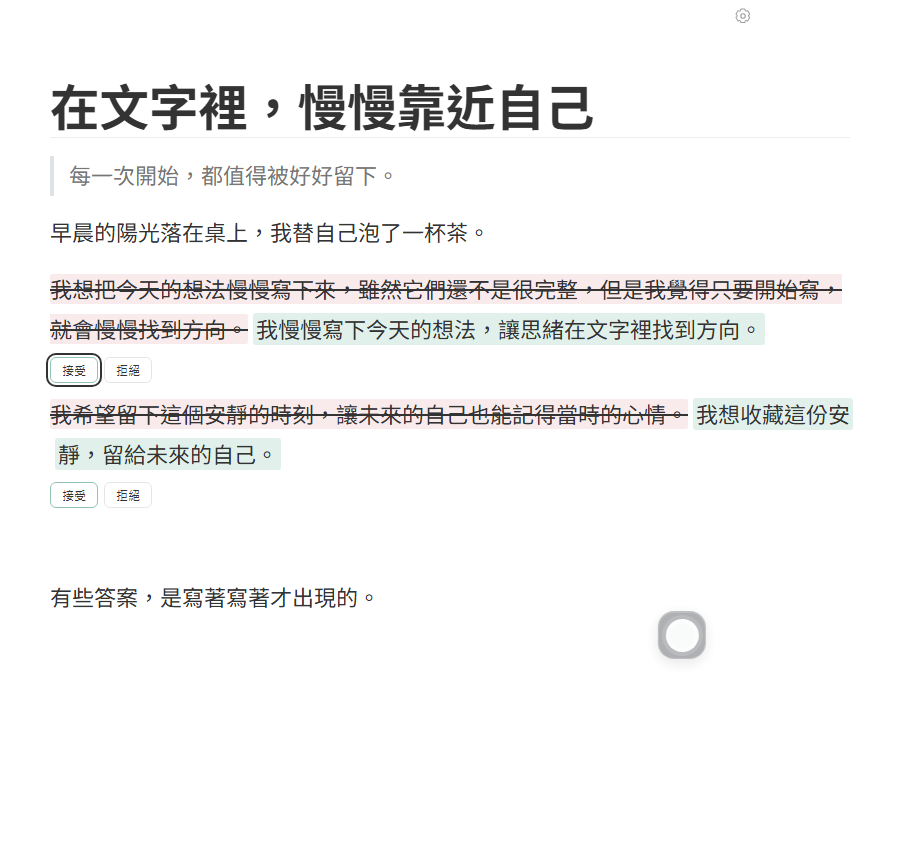
Visible review is not a correctness guarantee. A model can change a fact, drop a qualification, or flatten a voice you wanted to preserve. The review controls make the decision easier to inspect; responsibility for the final text still belongs to its author.
The model is a separate setup step
Wuffi does not install or start an AI model for you. You run a compatible service, then enter its API base URL and model name in the editor. Model downloads, hardware needs and any service charges belong to that separate setup.
The current editor has no API-key field, so services that require key authentication cannot be configured directly. Do not put a secret into a URL. If you want an account-based writing service that works immediately without model configuration, this preparation may outweigh the benefit. Read the connection guide before deciding.
Local files and local inference are different choices
Documents and drafts are stored locally. When you deliberately make an AI request, relevant content is sent to the model service you configured. A local endpoint is handled by that local service; another endpoint has its own data practices. Local document storage alone does not promise that every AI request stays on the computer.
Before working with sensitive text, check the destination and how the service handles it. For an initial test, use an unimportant passage. The privacy explanation describes the editor, model requests and website separately.
Start with a copy of an existing Markdown file
Wuffi saves standard .md files. That lets you evaluate an existing document without first committing an entire writing collection to a new database. Keep the original, work on a copy, and use a file representative of your normal writing rather than a perfectly simple demonstration.
Include relative image paths, headings, lists, links and a table. Add any extensions you rely on, such as mathematics, diagrams or footnotes. Markdown tools can differ in how they handle extensions and presentation, so successfully opening a file is only the first check.
Save the copy, inspect its source and reopen it in another editor. Check the actual text as well as the preview. If you depend on an export template or a specialized workflow, test that independently; this page does not claim complete feature parity with Typora.
Keep your existing editor and backups available during evaluation. You should be able to assess the new workflow without turning the trial into a migration project. Only move more documents after the small test has shown a practical benefit.
Other Typora alternatives solve different problems
MarkText is an open-source Markdown editor with published source and release information. If open source is your main requirement, examine its current releases and test your documents before deciding whether Wuffi's review workflow is relevant at all.
Obsidian is another direction when writing belongs within a collection of linked research and notes. Its Markdown files live in a local vault folder, so local ownership of text is not a reason unique to Wuffi.
Choose the question first: a direct document editor, a system for organizing connected notes, or an editor with a particular revision workflow. These are different priorities. Our broader Windows editor guide, in Traditional Chinese describes those choices without assigning every product a single overall score.
A practical checklist for evaluating a switch
When Wuffi's public build becomes available, use a repeatable test. The important comparison is what happens to your own writing, not how many unfamiliar options you can find in a menu.
- Copy a real article. Avoid using the only copy of an important document.
- Write without AI first. Check typing, punctuation, shortcuts, layout and saving.
- Check the model setup. Understand its destination, requirements and any additional cost.
- Request one limited revision. Review each suggestion rather than accepting the passage automatically.
- Reopen the saved file elsewhere. Check text, images and any syntax that matters to you.
- Judge the result. Did the workflow reduce repeated copying and make decisions easier, while retaining what you need?
The planned trial does not require a credit card or renew automatically. After it ends, existing articles remain available to read, copy, save and export. Public downloads are still in preparation; check the current version and licensing information before treating the plan as an available offer.
Common questions
Is Wuffi a free alternative to Typora?
No. The planned offer is a seven-day full-feature trial followed by a US$15 one-time license. Purchasing is not open yet, and third-party model or service charges are separate.
Can I download Wuffi now?
The public download is not available yet. You can watch actual development-build footage and read the setup instructions to understand the workflow. This comparison does not promise an already released download.
Does Wuffi run on Mac or Linux?
Development and verification currently focus on Windows x64. If you need another platform today, evaluate a tool with an available build for that platform.
Should I leave Typora if I already like it?
Only consider a switch if reviewing AI proposals inside your document solves a real problem, and the setup and availability fit your needs. Staying with a writing workflow that already works is a sensible outcome of the comparison.