Why separating drafting from grammar checking leads to cleaner articles
Always-on grammar extensions are handy for catching a typo in a quick email, but when you are writing a 1,500-word essay, technical guide, or report, constant real-time alerts create three problems:
- Broken concentration: Stopping mid-thought to dismiss a style card pulls you out of the argument you were building.
- Context-blind rules: Single-sentence rule checkers often flag intentional fragments, conversational transitions, or domain terminology as errors—while pasting your draft into a chat window often rewrites healthy sentences into generic corporate prose.
- Clutter inside Markdown and code blocks: Browser overlays frequently misalign or underline variable names, file paths, and Markdown syntax.
In Wuffi, turning on Focus mode (F8) and Typewriter mode (F9) gives you a quiet sheet of paper while you write. When you finish a section and want a writing checker or sentence checker, press Alt + A to proofread on your own terms.
Three online proofreading and grammar checking workflows compared
| Workflow aspect | Wuffi on-demand AI proofreading (Alt + A) | Always-on browser grammar extension | Pasting drafts into a chat window |
|---|---|---|---|
| When checks happen | Quiet while you type; runs only when you select text and press Alt + A | Underlines words and pops up cards continuously while you type | Requires copying text out to a separate chat tab |
| Scope of checking | You choose: strict typo/punctuation fixes only, or full grammar, tense, and awkward-sentence review | Fixed rule cards for spelling, punctuation, and preset tone | Often rewrites your style even when you only asked for proofreading |
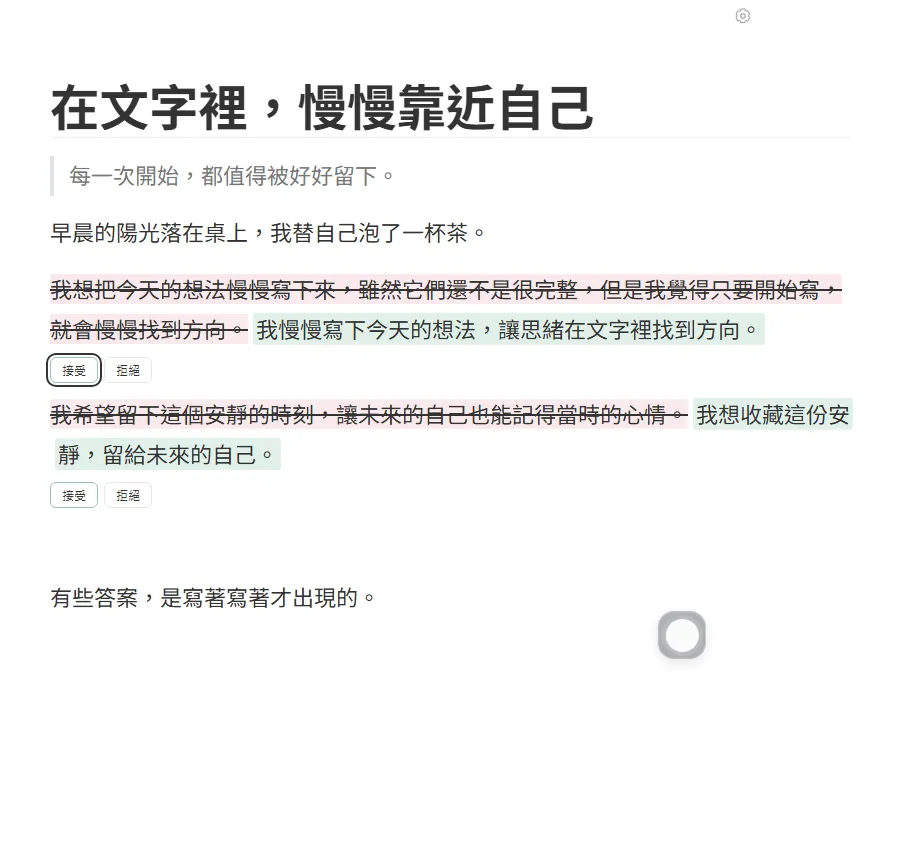
| How you approve fixes | Side-by-side inline diff per sentence; click Accept or Reject on each sentence | Click individual underlined words one popup at a time | Returns a whole block of text; you must spot differences manually |
| Markdown & technical text | Native Markdown editor; preserves code blocks, inline code, links, tables, and math | Can lag or misfire on complex web editors and code blocks | Copying back often breaks Markdown formatting |
4 targeted AI grammar, punctuation, and sentence check examples (illustrative)
Because Wuffi lets you state what kind of proofreading you want in Alt + A, you can ask for strict grammar and punctuation checks without letting the AI rewrite your voice. Below are illustrative editorial examples:
| Proofreading goal | Instruction in Alt + A | Original sentence (illustrative) | Proposed inline fix (illustrative) |
|---|---|---|---|
| Grammar & verb tense only | “Fix grammar and verb tense errors only; do not change my word choice” | We have deploy the hotfix yesterday afternoon, and the latency spike should resolved now. | We deployed the hotfix yesterday afternoon, and the latency spike should be resolved now. |
| Punctuation & comma splices | “Check punctuation and fix run-on sentences without changing the tone” | The export finished in two seconds, however the embedded font was missing on older PDF viewers. | The export finished in two seconds; however, the embedded font was missing on older PDF viewers. |
| Technical capitalization & typos | “Fix typos and standardize product capitalization; keep all inline code untouched” | After migrating the table to postgresql, we triggered the build via github actions using npm run deploy. | After migrating the table to PostgreSQL, we triggered the build via GitHub Actions using npm run deploy. |
| Awkward sentence checker | “Fix the dangling modifier while keeping the exact limitation” | By reducing the cache TTL, memory usage dropped by roughly 20% on read-heavy endpoints. | Reducing the cache TTL lowered memory usage by roughly 20% on read-heavy endpoints. |
Proofreading that respects your facts, qualifiers, and Markdown structure
Wuffi’s built-in voice calibration and fact-boundary rules keep online proofreading predictable:
- Healthy sentences stay untouched: If a sentence is already grammatical and clear, Wuffi is instructed not to alter it just to look busy.
- Qualifiers and numbers are preserved: Words like “might,” “approximately,” “estimated,” and “only on macOS” stay intact—proofreading never upgrades a hypothesis into a certainty.
- Code, links, and tables are protected: Fenced code blocks, inline code spans, URLs, and table values are preserved, and unaccepted suggestions are excluded when you save or export to PDF, Word (DOCX), or EPUB.
Want to go beyond proofreading? See our AI sentence and paragraph rewriter guide or compare workflows in our Grammarly & QuillBot alternative guide.
Common questions
Can I use Wuffi strictly as a grammar and punctuation checker without rewriting my style?
Yes. When you select a passage and press Alt + A, simply ask to “fix spelling, grammar, and punctuation only without changing word choice.” You still get sentence-by-sentence Accept and Reject buttons for full control.
Does Wuffi also support browser spellcheck and regex find-and-replace?
Yes. Alongside on-demand AI proofreading, Wuffi supports standard spellcheck as well as case-sensitive, whole-word, and regular-expression find and replace (with single-step undo for replace-all).
Is Wuffi free to try for online proofreading?
You can write and edit in the browser without signing in. Signing in with Google gives you a 7-day free trial of built-in AI proofreading and voice typing with no credit card required, or you can connect a free local model (Ollama or LM Studio) in the open-source desktop app.