Why standalone paraphrasing boxes and article spinners often make drafts worse
When you paste a paragraph into a traditional paraphrasing tool, rewording box, or chat window, three problems usually show up right away:
- Synonym swapping changes your meaning: Automated spinners and rigid paraphrasing modes often trade plain, accurate words for stiff synonyms—turning a clear technical explanation or personal essay into unnatural prose.
- Whole-paragraph replacement hides subtle edits: When you ask a chatbot to “rewrite my paragraph,” it hands back a brand-new block of text. You have to read both versions word by word to check whether it dropped a qualifier, altered a number, or flattened your tone.
- Lost context and broken Markdown: Pasting one paragraph into a separate rewriter strips away surrounding headings and context. Copying the result back into your document often breaks Markdown links, lists, inline code, or tables.
If your goal is to improve writing you already drafted—rather than spin an article—an inline AI sentence rewriter keeps you in control of every line.
Three ways to rephrase sentences and rewrite paragraphs compared
Here is how revising inline in Wuffi compares with a standalone paraphrasing tool box or copying text into a chat window:
| Feature | Wuffi inline rewriter (Alt + A) | Standalone paraphrasing tool box | Chatbot copy-and-paste |
|---|---|---|---|
| How changes are reviewed | Proposed edits appear inline next to your original text; accept or reject each sentence individually | Outputs a replaced block in a side pane that you copy back manually | Returns a new paragraph in a chat thread; requires manual eye-comparison |
| Tone and fact preservation | Built-in anti-cliché voice calibration (see before/after examples) preserves qualifiers, dates, and author voice | Preset modes (Fluency, Formal, Creative) often over-synonymize or shift certainty | Frequently adds press-release clichés (“not only X, but Y”, “in today’s fast-paced world”) |
| Markdown & document structure | Edits happen directly inside your .md document; unaccepted suggestions never enter saves or exports | Plain-text boxes often strip Markdown links, headings, and code spans | Pasting back can break list indentation, tables, and footnotes |
| Drafting & exporting | Includes Alt + S voice dictation and one-click export to .md, PDF, and Word (DOCX) | Rewriting only; requires another editor to finish and format the document | Split across chat history and your text editor |
4 illustrative sentence and paragraph rewriting examples
The examples below are illustrative editorial samples showing how targeted instructions work when you use Wuffi as a sentence improver or paragraph rewriter (not user documents or model benchmarks):
| Editing goal | Instruction in Alt + A | Original draft (illustrative) | Inline proposed rewrite (illustrative) |
|---|---|---|---|
| Tighten a wordy sentence | “Shorten this sentence and remove passive phrasing” | An initial evaluation of the client-side cache is currently being performed by our engineering team this week. | Our engineering team is evaluating the client-side cache this week. |
| Clean up a spoken rough draft | “Turn these spoken notes into a clear paragraph, keeping the uncertainty” | So basically the export button sometimes stalls for two or three seconds on large files, and I think it might be because image conversion is still synchronous. | Exporting large files sometimes stalls for two or three seconds, likely because image conversion still runs synchronously. |
| Rephrase for direct, polite clarity | “Make this polite but direct, and keep the Thursday deadline” | If your team does not send the sign-off email before Thursday evening, we won’t be able to launch on Monday as planned. | Please send your sign-off by Thursday evening so we can stay on schedule for Monday’s launch. |
| Merge repetitive sentences | “Combine the repeated idea and keep both limitations” | This setup works well for small teams. Small teams with limited time will find it helpful. However, it only runs on Windows right now and requires a local model. | This setup fits small teams with limited time, though it currently runs only on Windows and requires a local model. |
How to rewrite a paragraph or sentence in Wuffi in 4 steps
- Write or speak your rough draft first: Open app.wuffi.app, turn on Focus mode (F8) and Typewriter mode (F9), or press Alt + S to use voice typing to get your ideas down without stopping to edit every line.
- Highlight the exact sentence or paragraph: Select the specific sentence or paragraph that feels clunky and press Alt + A. Scoping the selection keeps the AI focused on that passage.
- Give a specific instruction: Tell the assistant what to change and what to keep—for example, “Rephrase this paragraph to be more concise, keep first-person voice, and preserve all numbers.”
- Accept or reject sentence by sentence: Review the side-by-side diff right in your article. Click Accept on the sentences that improved your draft and Reject on any you prefer to keep as written.
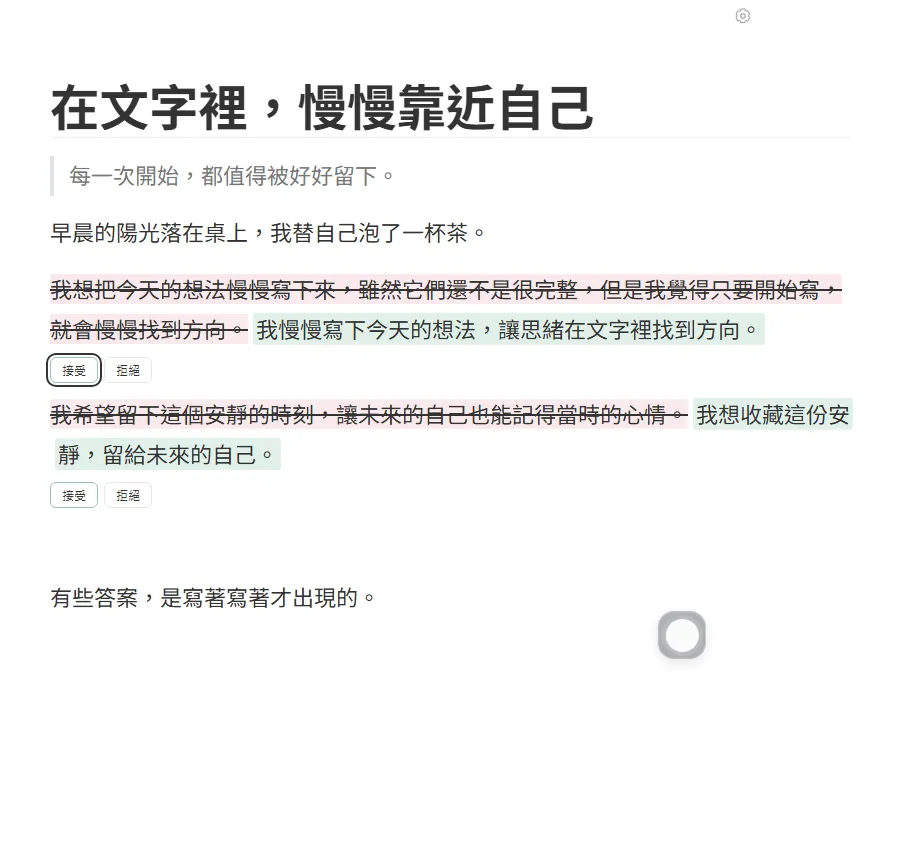
Use built-in Cloud AI or run a 100% free Local AI model
Wuffi gives you two ways to run inline sentence and paragraph rewriting:
- Zero-setup Web App (7-day free trial): Sign in with Google at app.wuffi.app to get a 7-day free trial of built-in AI editing and voice input (30 voice minutes/day + AI editing quota, no credit card required). Paid plans are US$15/month or US$144/year, while Markdown editing, cloud storage, and PDF/Word export stay free even without a subscription.
- MIT Open-Source Desktop + Local AI (free forever): Prefer keeping files on disk and running local models? Download the open-source desktop app on GitHub ↗ and connect it to local Ollama (
127.0.0.1:11434) or LM Studio (127.0.0.1:1234) in “⋯ → AI connection”.
Comparing tools? See our Grammarly & QuillBot alternative comparison or our AI proofreading and grammar checker guide.
Common questions
How is Wuffi different from a standard paraphrasing tool or article rewriter?
Standard paraphrasing boxes are designed to spin or reword isolated blocks of text in a separate window. Wuffi is a full Markdown writing editor where AI rewriting happens inline (Alt + A), calibrated to avoid robotic clichés, with sentence-by-sentence accept and reject controls.
Can I rephrase a single sentence without rewriting the whole paragraph?
Yes. Highlight just the sentence you want to improve and press Alt + A. Wuffi will propose an edit only for that selected sentence while reading the surrounding paragraph for context.
Does Wuffi train AI models on my writing?
No. We do not sell your data or use your documents to train AI models. Cloud AI requests are sent only when you press Alt + A under provider settings that do not retain or train on your text, and Local AI mode keeps everything on your own machine. See our privacy policy.
Do I need an account just to test the editor?
No. You can open app.wuffi.app and start writing in guest mode right away. Signing in with Google unlocks cloud sync and your 7-day free trial of built-in AI and voice input.