Wuffi, Grammarly, and QuillBot compared by writing workflow
Each of these writing tools is built around a different daily habit: Grammarly focuses on real-time grammar and tone overlays across web apps, QuillBot focuses on side-by-side paragraph paraphrasing and summarizing, and Wuffi is a distraction-free AI text editor and writing software built around portable Markdown files. Details below were checked in November 2026 against official vendor documentation:
| Category | Wuffi | Grammarly | QuillBot |
|---|---|---|---|
| Primary role | Distraction-free Markdown writing editor with built-in voice typing (Alt + S) and inline sentence-by-sentence AI review (Alt + A) | Cross-app writing assistant and browser extension for real-time grammar, spelling, and tone suggestions | Side-by-side paraphrasing tool, grammar checker, and summarizer |
| How AI edits work | Quiet while you write; press Alt + A on a selection to see proposed sentence diffs inline and click Accept or Reject per sentence | Continuous underlines and pop-up suggestion cards as you type, plus a sidebar for paragraph rewrites | Paste text into a split box and pick a preset mode (Fluency, Formal, Simple, Creative) to generate a replacement block |
| Anti-cliché voice control | Built-in natural voice calibration strips out robotic press-release clichés and preserves qualifiers and facts | Focuses on correctness, clarity, and preset business/academic tone sliders | Focuses on synonym substitution and structural rewording |
| Document format & export | Native .md files, tables, LaTeX math, and Mermaid diagrams; exports to PDF, Word (DOCX), EPUB, HTML, ODT, and LaTeX | Works inside third-party text fields or a basic rich-text document view | Works primarily inside single-passage or basic document text boxes |
| Offline & Local AI option | MIT open-source desktop app ↗ connects to local Ollama or LM Studio for 100% free offline AI editing | Cloud-based service | Cloud-based service |
| Free tier & paid plans | Markdown editing, cloud storage, and exports are free; 7-day free trial of built-in AI & voice (no card), then US$15/mo or US$144/yr | Free basic grammar checks; paid Pro and Enterprise plans (see vendor pricing) | Free word-limited tier; paid Premium plan (see vendor pricing) |
When you should stick with Grammarly or QuillBot
Switching tools only makes sense if it removes friction from what you actually write every day:
- Stay with Grammarly if you mostly write short messages across dozens of web tabs: If your main need is catching typos automatically inside Gmail, Slack, LinkedIn, or CRM forms, a browser extension that follows your cursor across websites is purpose-built for that job.
- Stay with QuillBot if you only want quick synonym variations on isolated sentences: If you already have a finished document elsewhere and just want to paste two sentences into a side-by-side paraphraser box to test different wordings, QuillBot’s mode switcher is straightforward.
When Wuffi is the better alternative for long-form writing
If you write blog posts, essays, newsletters, technical documentation, or book chapters, Wuffi replaces fragmented browser tabs with a calm, unified writing editor:
- True distraction-free writing while you draft: The top menu hides automatically as soon as you start typing. Turn on Focus mode (F8, dimming other paragraphs) and Typewriter mode (F9, keeping your active line centered) so no grammar pop-ups interrupt your train of thought.
- Inline AI editing without copy-and-paste: Instead of copying paragraphs out to a paraphrasing box, highlight any passage and press Alt + A for inline sentence rewriting or on-demand AI proofreading. You review old and new sentences side by side and accept or reject each one individually.
- Portable Markdown files you actually own: Your articles are standard
.mdfiles with up to 50 automatic cloud versions per document, instant PDF and Word (DOCX) export, and one-click full ZIP backup.
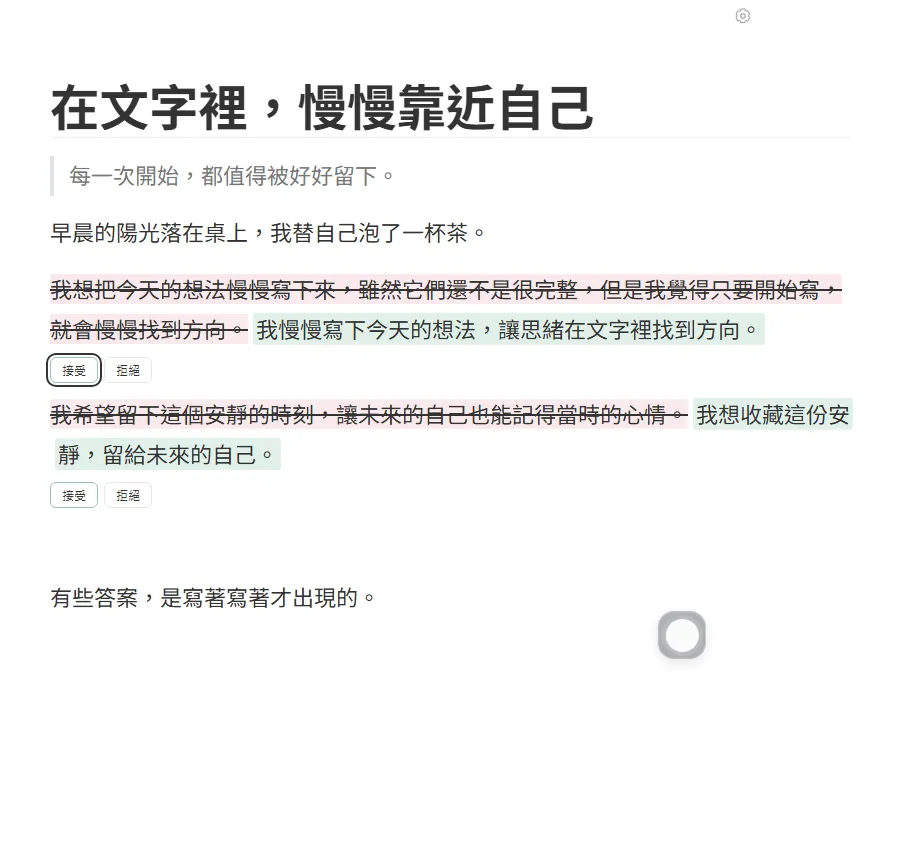
From blank page to finished draft: voice dictation + sentence review
Unlike standalone grammar checkers or paraphrasing boxes, Wuffi includes built-in AI voice typing and smart cleanup (Alt + S):
- Speak rough drafts at your cursor: Hold Alt + S and talk through your idea. Wuffi strips out “um” and “uh,” keeps your mid-sentence self-corrections, adds punctuation, and formats spoken points into Markdown lists.
- Refine with Alt + A: Highlight the spoken paragraph, ask Wuffi to tighten it while keeping your tone, and approve each sentence diff inline.
Zero-setup Cloud AI or free MIT Open-Source Local AI
You never get locked into a subscription just to open or edit your work. In the web app (app.wuffi.app), Markdown editing, cloud sync, and exports remain free even after your 7-day AI trial ends. And if you prefer running local models on your own hardware, you can download the MIT open-source desktop app on GitHub ↗ and connect local Ollama (127.0.0.1:11434) or LM Studio (127.0.0.1:1234) at zero cost. Also comparing desktop Markdown editors? See our Wuffi vs. Typora comparison.
Common questions
Is Wuffi a browser extension like Grammarly?
No. Wuffi is a standalone web-based Markdown writing editor (app.wuffi.app) and open-source desktop app designed for drafting, editing, and exporting complete documents without injecting floating widgets into other websites.
Can I use Wuffi as a free QuillBot alternative for rewriting paragraphs?
You can test Wuffi’s built-in Cloud AI rewriter (Alt + A) free for 7 days by signing in with Google (no credit card required), or use the Alt + A inline rewriter completely free forever by connecting your own local Ollama or LM Studio model in the open-source desktop app or browser Local AI settings.
What happens to my documents if I don’t subscribe after the 7-day trial?
There is no automatic charge, and your documents are never locked. You can continue signing in to write, edit, save to the cloud, and export to .md, PDF, Word (DOCX), or ZIP for free.